Catch schedule slips before they happen
PathProof reads your Microsoft Project or Primavera P6 file and runs the checks a schedule review actually needs: the DCMA 14-point assessment, Monte Carlo risk forecasting, update-to-update comparison and update integrity. Even large schedules process within seconds.
Free 7-day trial, no signup. After 7-days, register the free beta version with your email address.
No admin rights needed to install. Information for your IT team.
Your schedule never leaves your machine. Analysis runs locally: no file upload, no cloud.
“DCMA isn't a formality, it's the gate - you can't trust a forecast built on bad data. PathProof runs that check properly, then lets me ask the schedule questions in plain language that used to take hours, sometimes days, to answer by hand. Work that used to eat my week now takes minutes.”
AI schedule assistant
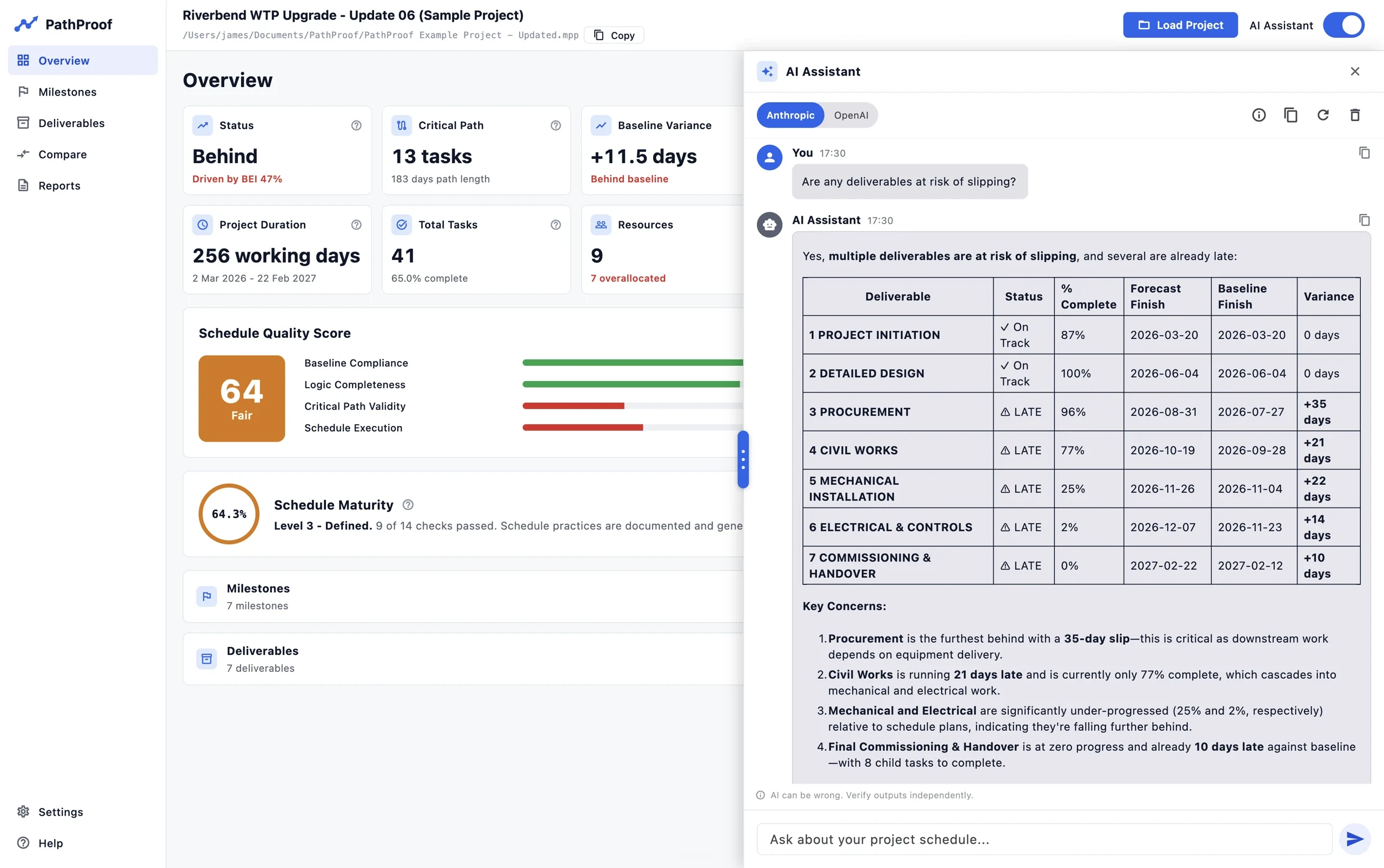
Ask the schedule questions in plain language: trace logic chains, find why a milestone moved, list every task driving a delay. Optional, with your own API key.
Schedule quality score
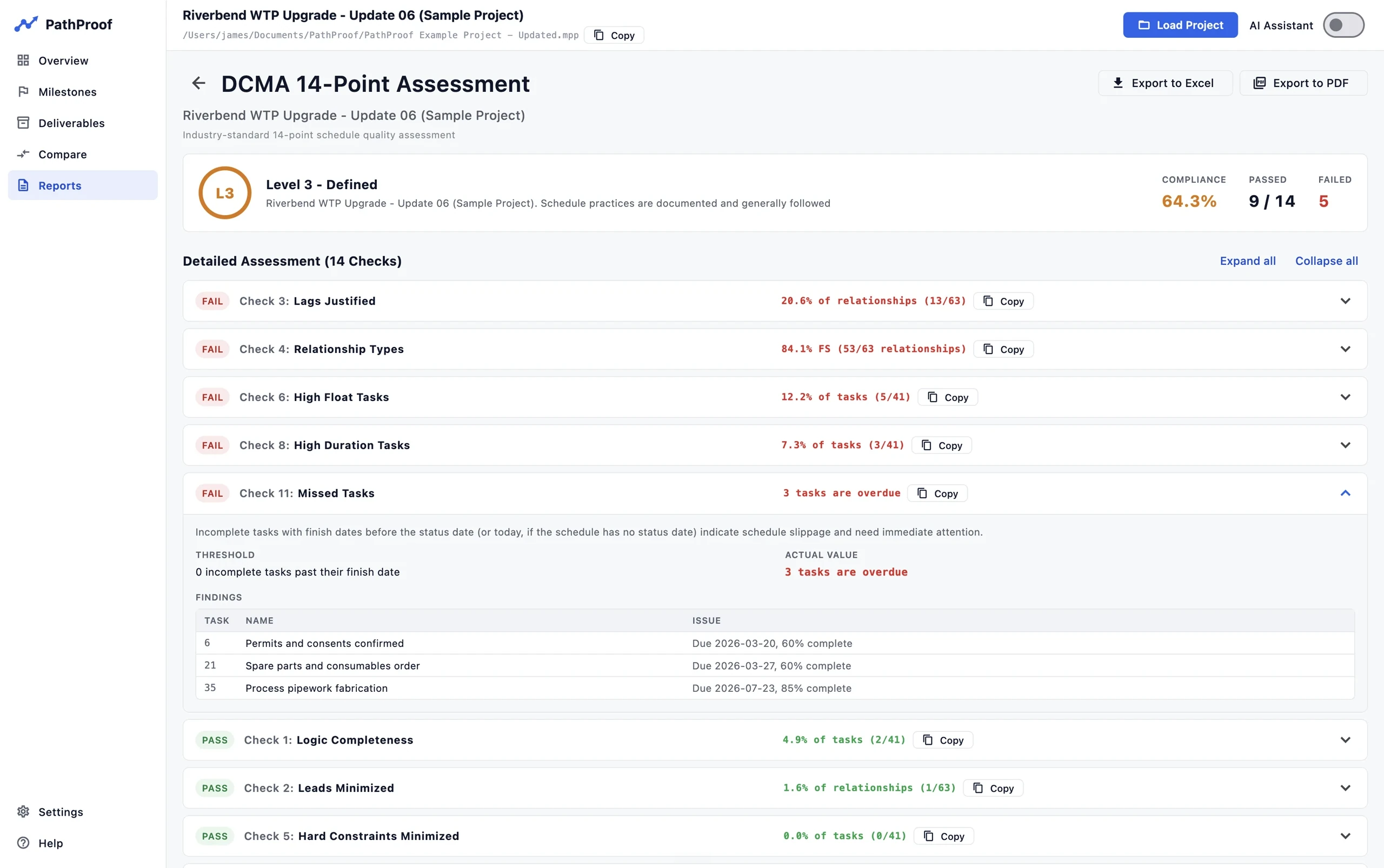
Automated DCMA 14-point health check with a visual scorecard. Identify logic gaps and missing constraints instantly.
Risk forecasting
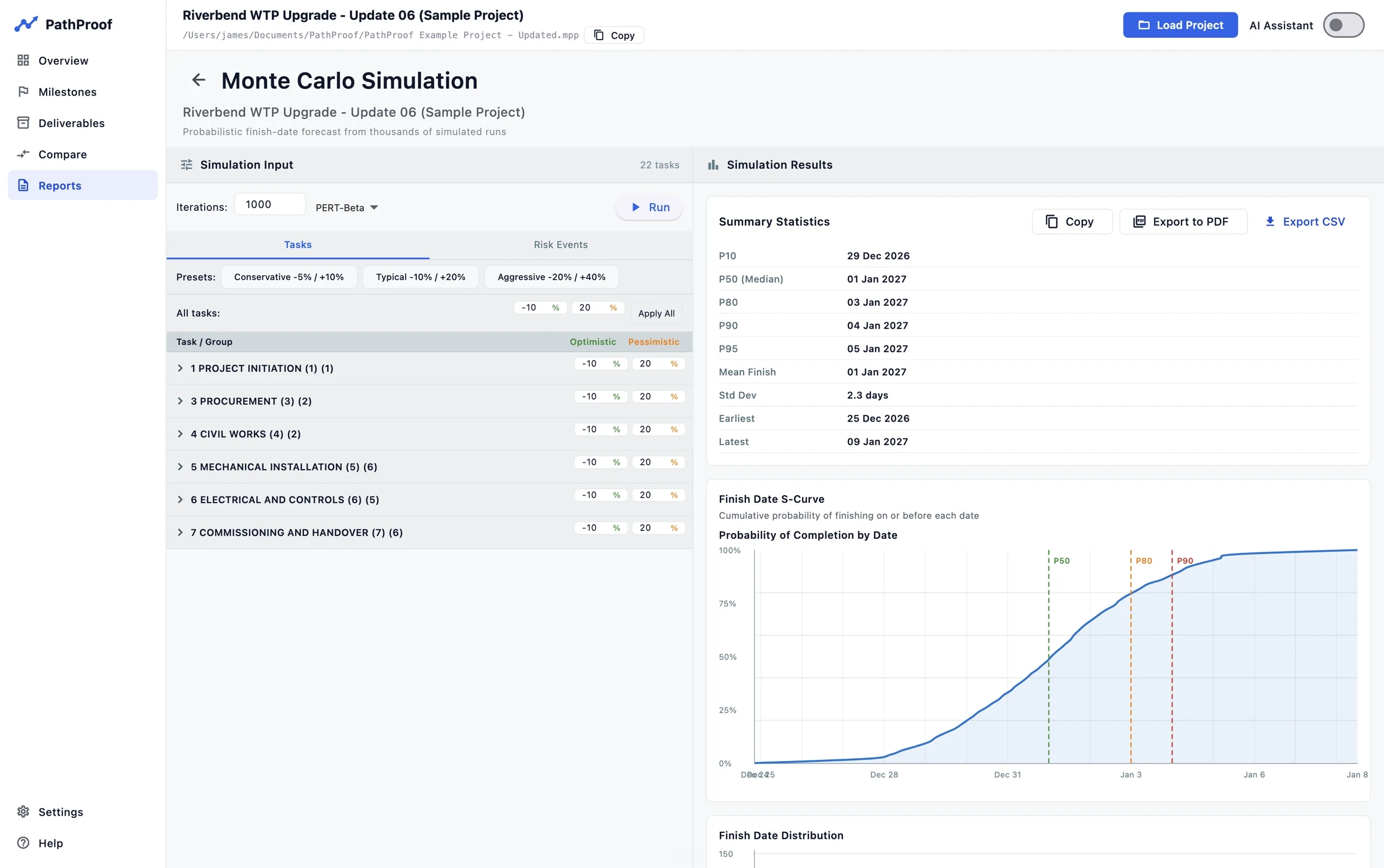
Monte Carlo simulation, confidence ranges on your finish date, and a tornado chart of the real risk drivers.
Update-to-update compare
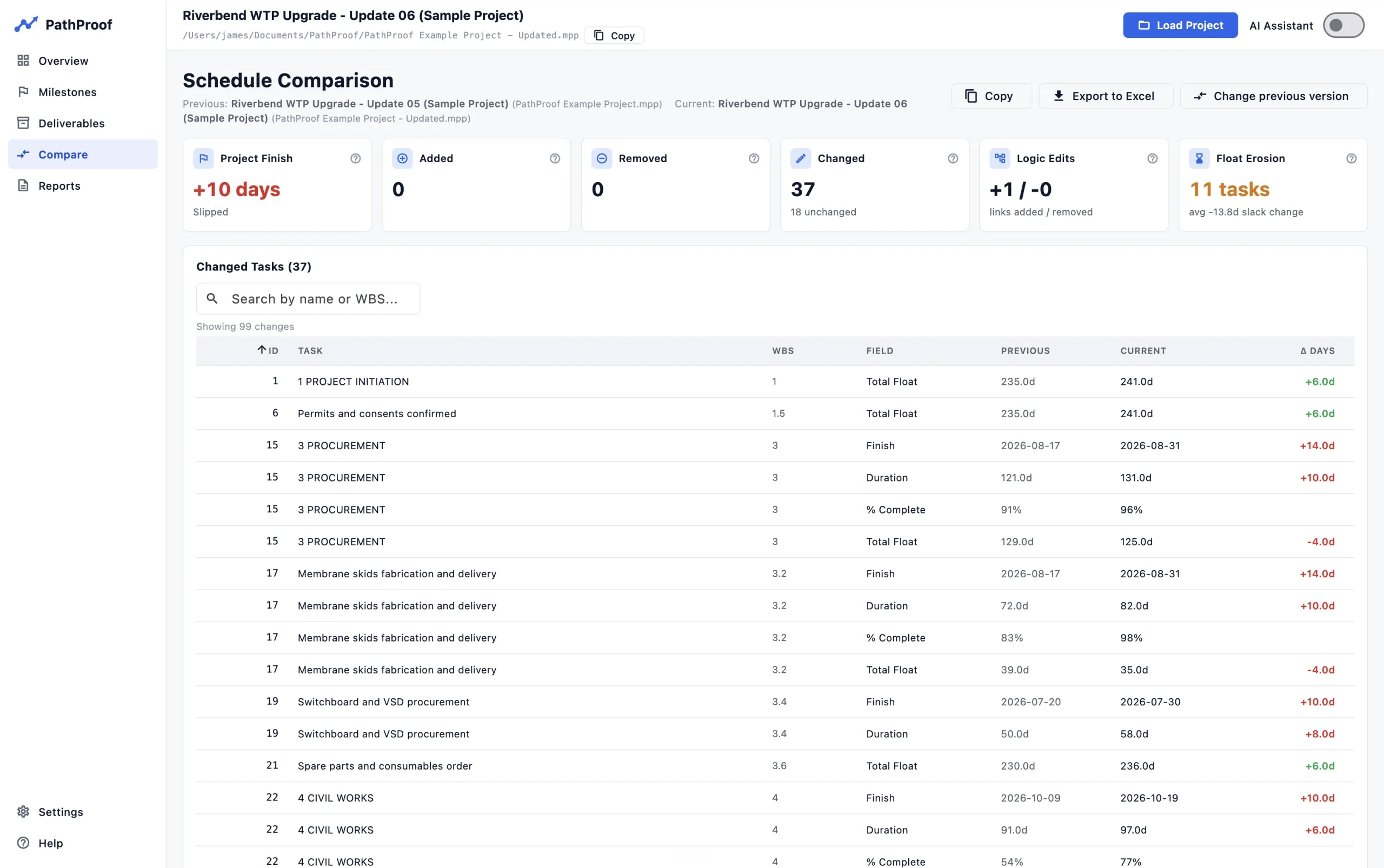
Load two updates of the same schedule and see every change: dates, durations, logic edits, critical path moves and float erosion.
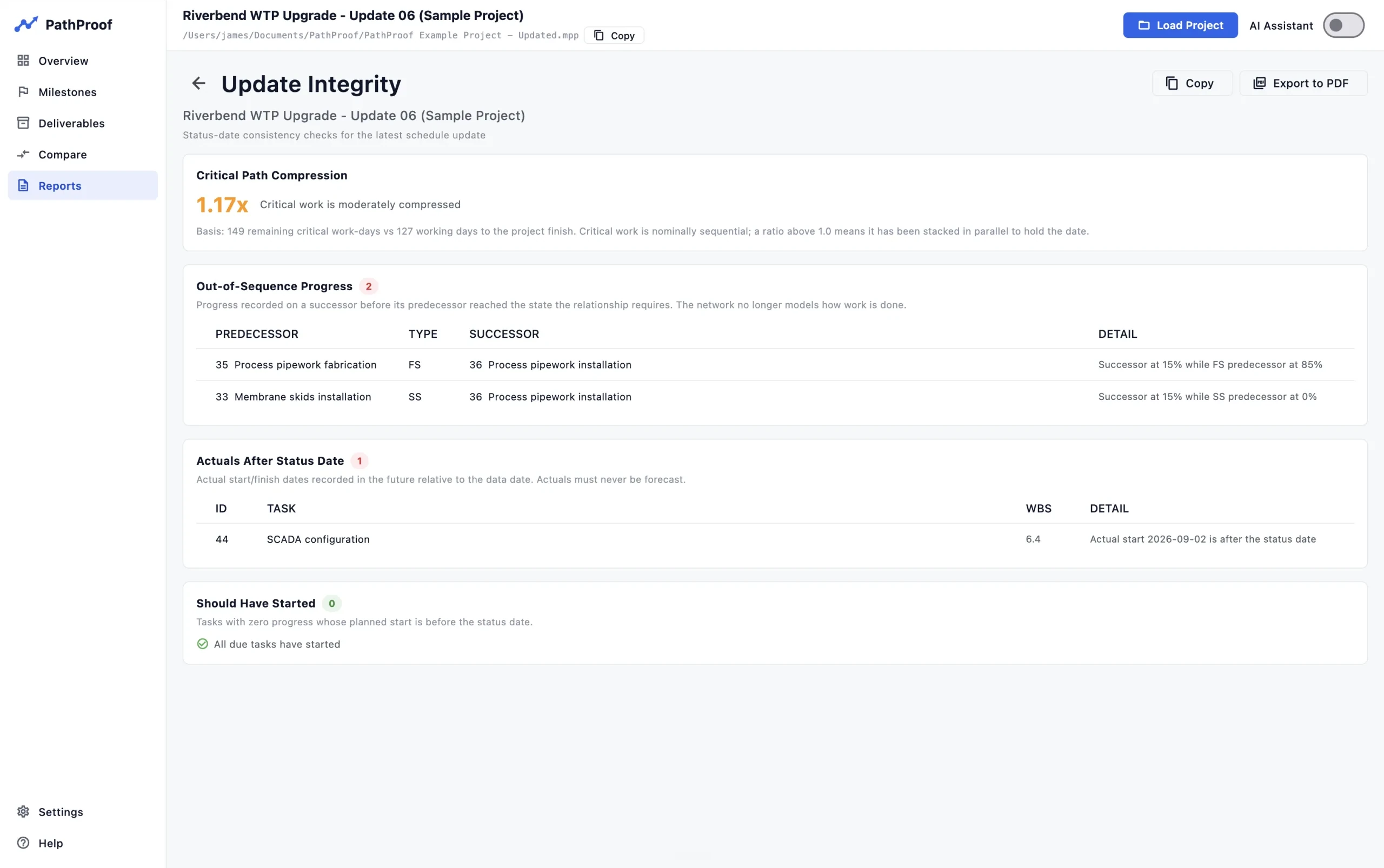
Update integrity
Out-of-sequence progress, actuals after the status date, due tasks with no progress and critical path compression, checked before the numbers travel.
Audit-ready reports
One-click Excel and PDF exports you can put in front of governance. Professional, structured data formatted for immediate review.
Ask the schedule questions in plain language
The questions that used to mean hours of digging through a few thousand lines - trace the chain of logic behind a milestone, explain why it moved since last update, list every task driving a specific delay - answered in seconds. The assistant runs the same analysis engines you do and cites its numbers, so every answer is checkable, not a black box.
Uses your own Anthropic or OpenAI API key, and it is entirely optional:
every analysis in PathProof runs locally with no AI at all.
The DCMA 14-point check, automated
Running complex compliance checks manually takes days of effort and focus, leading to human error. PathProof automates the industry standard 14-point check, giving you a quantifiable quality score that updates as you refine your schedule logic.
A finish date with confidence levels attached
Monte Carlo simulations often require expensive additional software. PathProof brings it directly into your workflow, providing P50 and P90 confidence levels so you can commit to deadlines with statistical confidence, not just hope.
Every change between updates, on one screen
Load this month's update next to last month's and PathProof lists exactly what moved: finish date movement, added and removed tasks, every date, duration, progress and float change per task, logic edits, and tasks that joined or left the critical path. Float erosion is totalled, so a schedule that holds its dates while quietly consuming slack still gets flagged. One click exports the full comparison to Excel for the review pack.
Trust the update before you report it
The Update Integrity report checks the update itself before the numbers travel: out-of-sequence progress, actuals recorded after the status date, due tasks with no progress, and critical path compression when remaining critical work is stacked tighter than the time left to the finish. The questions a forensic reviewer would ask, answered before the report leaves your desk.
Download and run
No signup, no credit card, no sales call. The first 7 days ask for nothing at all.
Drop in your schedule
Works with .mpp files saved by Microsoft Project and Primavera P6 exports (.xer and PMXML). Professional answers in seconds, from your own schedule file.
Register free to keep going
After 7 days the app asks for an email address to issue a free beta licence. Still free, for the whole beta.
Free while in beta.
PathProof is free during the beta because we are dialling in features and pricing with working schedulers: your direct feedback shapes what features we ship. We are seeking feedback about pricing from our beta users, and you'll get clear notice before anything changes.
Questions about pricing, or anything else? Ask us, or email support@zenithappfoundry.com.
“As a master scheduler, I spend a lot of time proving a schedule is sound before anyone else has to trust it. One thing I always stress: you can't get meaningful risk analysis out of a schedule with bad data. If the logic is broken, float is unrealistic, or dates are constrained where they shouldn't be, a Monte Carlo forecast is just garbage in, garbage out. That's why DCMA 14-point comes first - it's not a formality, it's the gate you have to pass before any forecast means anything.
PathProof gets that. It runs the data quality checks properly, then builds the risk analysis on top of a schedule you can actually trust - all in seconds, on work that used to take me most of a day by hand.
The AI assistant has been the real game changer, though. Questions that used to mean hours, sometimes days, of digging through a schedule by hand - tracing a chain of logic, figuring out why a milestone moved, finding every task driving a specific delay - I can now just ask in plain language and get an answer in seconds. For anyone who's had to manually trace critical path drivers across a few thousand lines, you know what that time actually costs.
I tested PathProof against real, messy schedule scenarios, and it holds up. The fact that everything runs entirely locally was a hard requirement for the kind of work I do, and PathProof delivers on that too. This is the tool I wanted to exist.”
Put your schedule to the proof
Free 7-day trial, no signup. After 7-days, register the free beta version with your email address.
No admin rights needed to install. Information for your IT team.
Can we help?
Ask us anything: whether PathProof will read your file, what a particular check measures, what your IT team will want to know, or what happens after the beta.